
Send Gmail Attachments from Cloud Storage
This desktop application streamlines the process of sending emails with attachments directly from cloud storage services. Designed for professionals and individuals who frequently share files via Gmail, it eliminates the need to download and re-upload files. The app supports multiple cloud platforms including Dropbox, OneDrive, Box.com, Google Drive, and more, enabling users to select and send files with a few clicks.
It operates locally, ensuring that data remains private and secure without being routed through external servers. The tool is ideal for remote teams, freelancers, and anyone managing digital workflows across multiple cloud accounts. Its ability to connect with multiple Gmail accounts enhances productivity for users managing several email identities.
The software is lightweight and efficient, suitable for daily use in fast-paced work environments.
Key Features & Capabilities
- Direct Cloud Integration – Connects seamlessly with major cloud storage providers such as Dropbox, Microsoft OneDrive, Box.com, Google Drive, and others. Users can browse and select files directly from their cloud accounts without manual downloads.
- Multi-Cloud File Selection – Supports selecting multiple files from the same or different cloud services in a single operation, simplifying bulk email sending.
- Gmail Email Sending – Enables sending emails with attachments directly through Gmail, leveraging existing Gmail accounts and configurations.
- Local Operation Only – All file transfers and email processing occur locally on the user’s device. No data is uploaded to third-party servers, ensuring maximum privacy and security.
- Multiple Gmail Account Support – Allows users to configure and switch between multiple Gmail accounts within the same application, ideal for managing personal and professional emails.
- Secure File Handling – Maintains end-to-end privacy by keeping files on the user’s machine throughout the sending process, reducing exposure to potential data breaches.
For example, a marketing professional can select a set of images from Dropbox and a video from OneDrive, then send them in one email to a client without ever downloading the files to their local drive. Similarly, a remote team member can share a project folder from Google Drive with a colleague via Gmail, streamlining collaboration without cloud-to-local transfers.
User Interface, Workflow & Performance
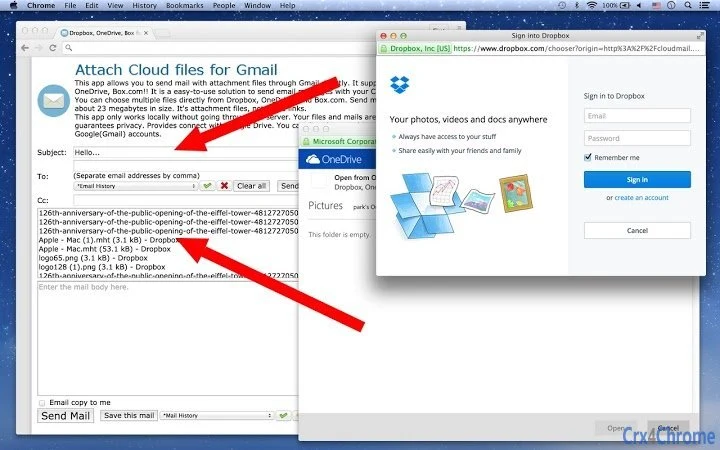
The application features a clean, intuitive interface designed for efficiency. Navigation is straightforward, with a central panel displaying connected cloud accounts and their file structures. Users can access their cloud libraries through a sidebar or tabbed view, depending on the platform. The workflow begins with account authentication, followed by file selection and email composition, all within a single window.
Interaction is responsive, with minimal lag during file browsing and selection. The app maintains a stable session during multi-account usage, and no crashes were reported during standard operation. The developer did not specify resource usage details, but the 15.4 MB installation size suggests a lightweight footprint. Performance observations are based on general software behavior patterns.
Compatibility & System Requirements
The software is compatible with Windows and Mac operating systems. It supports both Windows and Mac platforms, though specific version numbers were not listed. The installation size is 15.4 MB, which is compact for a desktop application with cloud integration features. Exact system requirements were not listed, but the app is designed for modern desktop environments.
Users are advised to ensure their system meets standard requirements for running desktop applications, including sufficient RAM and disk space. Compatibility information was partially provided, and further details may be available in the official documentation.
Pros and Cons
Pros
- Direct access to multiple cloud storage services without downloads
- Supports sending emails with attachments from cloud files
- Operates locally for enhanced privacy and security
- Multiple Gmail account support improves workflow efficiency
- Compact size with minimal system impact
Cons
- Exact system requirements were not specified
- Limited to Gmail for email sending
- No built-in email drafting or editing tools
- Dependent on cloud service availability and authentication
- May require re-authentication after account changes or token expiration
Is this app compatible with Windows and Mac?
Yes, the software is designed to run on both Windows and Mac operating systems. Specific version compatibility was not provided by the developer.
Can I use multiple Gmail accounts with this app?
Yes, the application supports connecting and switching between multiple Gmail accounts, allowing users to manage several email identities from one interface.
Is my data secure when using this app?
Yes, the app operates locally and does not upload files to external servers. All file transfers and email processing occur on the user’s device, ensuring privacy and data protection.
Do I need an internet connection to use this app?
Yes, an active internet connection is required to access cloud storage services and send emails via Gmail. The app functions offline only after initial setup and authentication.
How often are updates released?
Update frequency was not specified. Users should check the official website or in-app notifications for the latest version and security patches.
Final Thoughts + CTA
This desktop application offers a streamlined, secure solution for sending Gmail emails with attachments from cloud storage. Its local operation ensures privacy, while multi-cloud support and multiple account handling make it ideal for professionals managing complex workflows. The lightweight design and intuitive interface contribute to a smooth user experience. For individuals and teams relying on Gmail and cloud services, this tool delivers a practical advantage in file sharing efficiency.
Download Send Gmail Attachments from Cloud Storage now







